
Table of Contents
If you run a modern Laravel application with Inertia.js SSR (Server-Side Rendering), you are likely using PM2 to keep the Node.js server alive. To do this, many developers use a standard configuration: a PM2 supervision PHP wrapper. This involves telling PM2 to run php artisan inertia:start-ssr, which in turn spawns the actual Node.js process.
It looks elegant in a configuration file. It works perfectly in local development. But on a production server—especially on cPanel or CloudLinux shared hosting—this specific architecture can create a massive blind spot.
In this case study, we will walk through exactly how this setup led to a severe process time alert (49,291 seconds, to be exact), the forensic steps taken to diagnose the hidden issue, and the final, flawless configuration that permanently resolved it.
The Anatomy of a 49,291-Second Process Time Alert
The problem started with a message from the server administrator:
Resource: Process Time
Exceeded: 49291 > 3600 (seconds)
Executable: /usr/local/bin/node
Command Line: node /home/user/app/bootstrap/ssr/ssr.js
Killed: No
This alert is a major red flag. The account had accumulated over thirteen hours of CPU time on a single process, blowing past the standard 3,600-second (one-hour) limit.
Crucially, the alert noted Killed: No. This meant the process was not terminated; it was still running and continuing to consume resources. The primary culprit was the actual Node.js executable (ssr.js), not the php artisan command that PM2 was supposedly supervising.
Tracing the Process Tree: The PM2 Supervision PHP Wrapper
The first instinct is to kill the Node.js process to stop the resource drain. However, running kill <PID> resulted in a new Node.js process appearing within seconds, immediately locking onto port 13714 and throwing an EADDRINUSE (Address already in use) error if we tried to run it manually.
Walking the process parent chain (ps -o pid,ppid,cmd) revealed the hidden architecture:
- PM2 God Daemon: The supervisor.
- PHP Artisan: The child process PM2 was actually watching.
- Node.js SSR: The grandchild process doing all the real work.
This is where the PM2 supervision PHP wrapper creates a critical blind spot. PM2’s built-in resource limits—specifically max_memory_restart—only measure the RSS (Resident Set Size) memory of the direct child process.
Because PM2 was watching the PHP wrapper, it was only monitoring the PHP process (which uses a stable, low amount of memory). The actual Node.js process—the one compiling Vue/React components and consuming gigabytes of RAM—was completely invisible to PM2. The memory limit would never trigger, and CloudLinux would eventually flag the runaway process.
The Temporary Fix: Implementing cron_restart
Before altering the entire architecture, we implemented a band-aid solution: forcing PM2 to recycle the entire process tree on a schedule.
By modifying the ecosystem.config.cjs file, we added a cron_restart rule and increased the kill_timeout:
javascript
module.exports = {
  apps: [
    {
      name: 'laravel-ssr',
      script: 'artisan',
      args: 'inertia:start-ssr',
      interpreter: 'php',
      instances: 1,
      autorestart: true,
      max_memory_restart: '150M', // Limit applied only to PHP
      cron_restart: '0 4 * * *',  // Restart daily to reset CPU time limits
      kill_timeout: 10000,        // Allow PHP to gracefully shut down Node
    },
  ],
};
Running pm2 restart laravel-ssr confirmed that the PHP wrapper correctly forwarded the SIGTERM signal to the Node child process. The port was released, and a fresh process tree started.
The cPanel Wall-Clock Quirk
Shortly after, a second alert fired. But this time, checking the live process with top revealed a massive surprise:
- CPU Usage: 0.3% (Sleeping)
- CPU Time Consumed: 3.25 seconds
- Memory: 111 MB
The Node.js server was highly efficient and practically idle. It wasn’t spinning out of control; it was simply alive.
The issue was discovered: CloudLinux limits background processes by wall-clock time, not just CPU time. Even if a process is perfectly healthy and using 0% CPU, if it stays alive for more than 60 minutes, CloudLinux’s Process Time limit will trigger.
The Definitive Solution: Direct Node Supervision
To permanently solve the problem and clean up the server logs, we abandoned the PHP wrapper entirely. We changed PM2 to talk directly to the Node.js bundle.
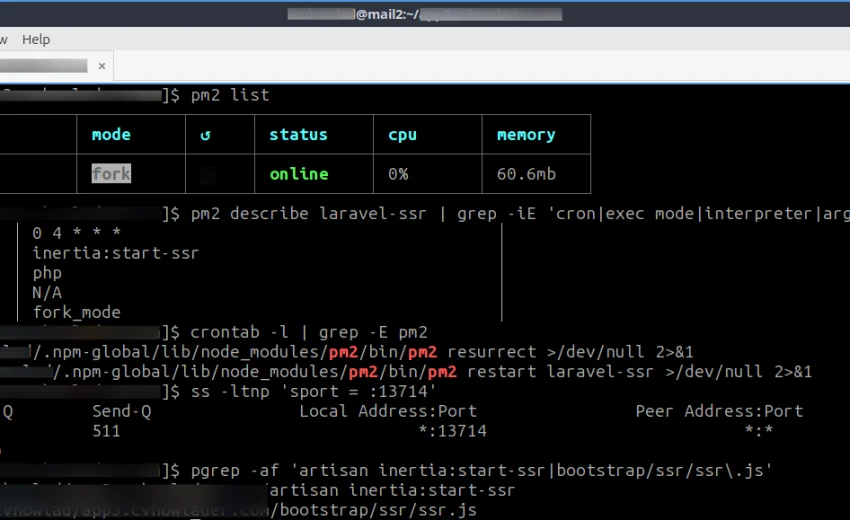
[Insert your redacted terminal screenshot here]
We updated the ecosystem.config.cjs to the following:
javascript
module.exports = {
  apps: [
    {
      name: 'laravel-ssr',
      script: 'bootstrap/ssr/ssr.js',   // Direct to Node.js
      interpreter: 'node',              // Drop the PHP wrapper
      cwd: '/home/user/app',
      instances: 1,
      autorestart: true,
      watch: false,
      max_memory_restart: '300M',       // Now PM2 watches Node.js RSS directly
      kill_timeout: 5000,
      cron_restart: '0 4 * * *',        // Daily recycle
    },
  ],
};
By removing the php artisan layer, PM2 was finally watching the actual process consuming the memory. Additionally, this eliminated annoying ionCube PHP Loader errors in the logs, as PHP was no longer being invoked by the process manager.
Working with the Host: The Admin Exception
To resolve the strict CloudLinux wall-clock limit, we communicated directly with the server administrator. We explained that the node ssr.js process was healthy, using 0% CPU, and was a necessary persistent process for the application’s SSR functionality.
The administrator applied a whitelist exception for the specific domain and command line. With the limit removed, we could relax the PM2 cron_restart back to a standard daily maintenance schedule (0 4 * * *), eliminating hourly micro-downtime while still ensuring the Node.js V8 heap was cleared daily.
Finally, we added an external crontab entry to ensure PM2 resurrects the application after a server reboot:
bash
@reboot /home/user/.npm-global/lib/node_modules/pm2/bin/pm2 resurrect
0 4 * * * /home/user/.npm-global/lib/node_modules/pm2/bin/pm2 restart laravel-ssr
Final Best Practices for Node.js SSR on cPanel
If you are deploying Node.js SSR applications on managed hosting, keep the following lessons in mind:
- Drop the PHP Wrapper: Supervise your Node.js bundle directly. It removes a layer of abstraction, fixes memory limits, and cleans up your logs.
- Understand the Limits: Know the difference between CPU Time and Wall-Clock Time. CloudLinux will kill a sleeping process if it lives too long.
- Communicate with Your Host: Automated restarts are great for immediate stability, but a simple conversation with your server admin can often yield a permanent whitelist exception.
- Always Configure
@reboot: PM2 does not survive a reboot on cPanel unless you configure it to resurrect the process list via a crontab.
What is a PM2 supervision PHP wrapper?
A PM2 supervision PHP wrapper is a configuration where PM2 is instructed to run a PHP command (like php artisan inertia:start-ssr), which in turn starts a Node.js process. This is common in Laravel/Inertia setups but can obscure the Node.js process from PM2’s resource monitoring.
Why did cPanel exceed the 3,600-second process time limit?
cPanel and CloudLinux enforce a strict 1-hour wall-clock limit on background processes. Even if a Node.js server is using 0% CPU, if it stays alive for more than 60 minutes, it will trigger a Process Time alert.
Why is my max_memory_restart limit not working?
If PM2 is running a PHP wrapper, it only measures the RSS memory of the PHP process. The actual Node.js child process is invisible to PM2, meaning the memory limit will rarely trigger, leaving the Node server vulnerable to memory leaks.
How do I fix the ionCube PHP Loader error in PM2 logs?
This error occurs when the cPanel PHP CLI environment is misconfigured. You can bypass it completely by changing your PM2 script to bootstrap/ssr/ssr.js and your interpreter to node, removing PHP from the process entirely.
How do I make PM2 survive a cPanel server reboot?
Because cPanel does not use systemd for user processes, PM2 will not automatically start after a reboot. You must add an @reboot cron job that executes pm2 resurrect using the absolute path to the PM2 binary.
Don’t forget to check my other posts:
November 1, 2026