
A local production server clone is not a luxury. It is the only backup test that matters. I learned this the hard way when I realized no one had ever restored the backups from a production server running four applications. The dumps existed. The restore script did not. That gap became a project I finished in several hours, and this is the full case study.
The server is an AlmaLinux 8.10 box with two WordPress sites, a Laravel 12 API, and a statically exported Next.js site. The goal was simple: build a complete local clone on a local machine using Docker Compose, so that when production goes dark, the local machine holds a runnable copy of everything.
Table of Contents
The Production Environment
Before designing anything, I inventoried the server. The results shaped every decision that followed.
| Path | App | Size | Database |
|---|---|---|---|
~/public_html | WordPress (main) | 340 MB | cvhowlad_wp |
~/wp2next.cvhowlader.com | WordPress (headless) | 111 MB | cvhowlad_wp2next |
~/app3.cvhowlader.com | Laravel 12.53 | 16 MB | SQLite |
~/next.cvhowlader.com | Next.js static export | 744 KB | — |
~/demo.cvhowlader.com | WordPress (staging) | 310 MB | cvhowlad_demo — skipped |
Three problems drove the project. First, the backups were untested. Second, there was no safe place to test plugin updates or Laravel migrations. Third, recovery was a complete unknown. If the server disappeared, how long would it take to stand everything back up? I had no answer.
Cloudflare sits in front of the site, which matters for the lockout scenario. DNS can be repointed in seconds. But DNS only points to content. The content and data had to live somewhere else. That somewhere else became the local machine(local production server clone).
Design Goals
The local production server clone had to meet strict requirements:
- No production services required locally. No MySQL server, no Redis, no S3. The Laravel app already used SQLite for sessions, cache, and queue. The WordPress sites used MySQL on the same host.
- No network dependency at restore time. Laravel’s
vendor/directory is copied, not reinstalled. The static Next.js export needs no Node.js. - Same hostnames inside and outside containers. WordPress loopback requests and
wp-cronmust resolvecvhowlader.localhostfrom inside the PHP container. - No outbound risk. Mail blocked by default. Empty AWS credentials confirmed. Laravel set to
MAIL_MAILER=log. - Local-only binding. Everything on
127.0.0.1. - Idempotent. Re-running the restore script overwrites the local(local production server clone) copy without touching production.
Architecture Overview
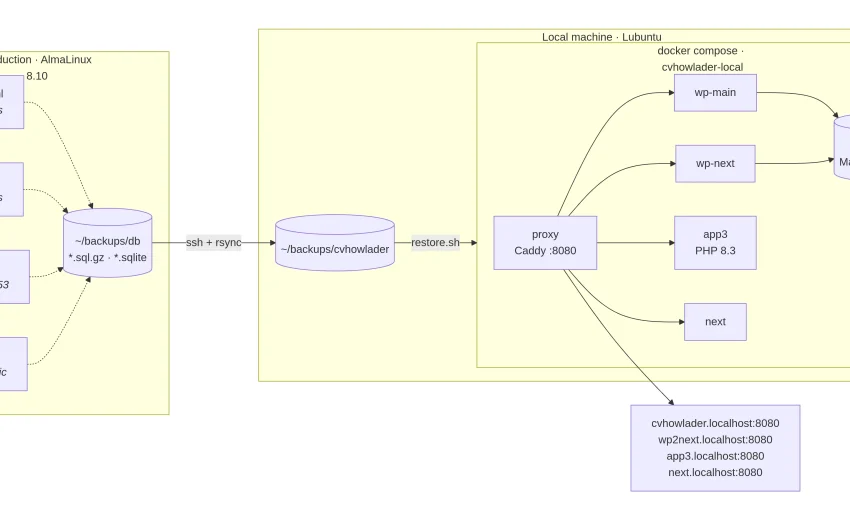
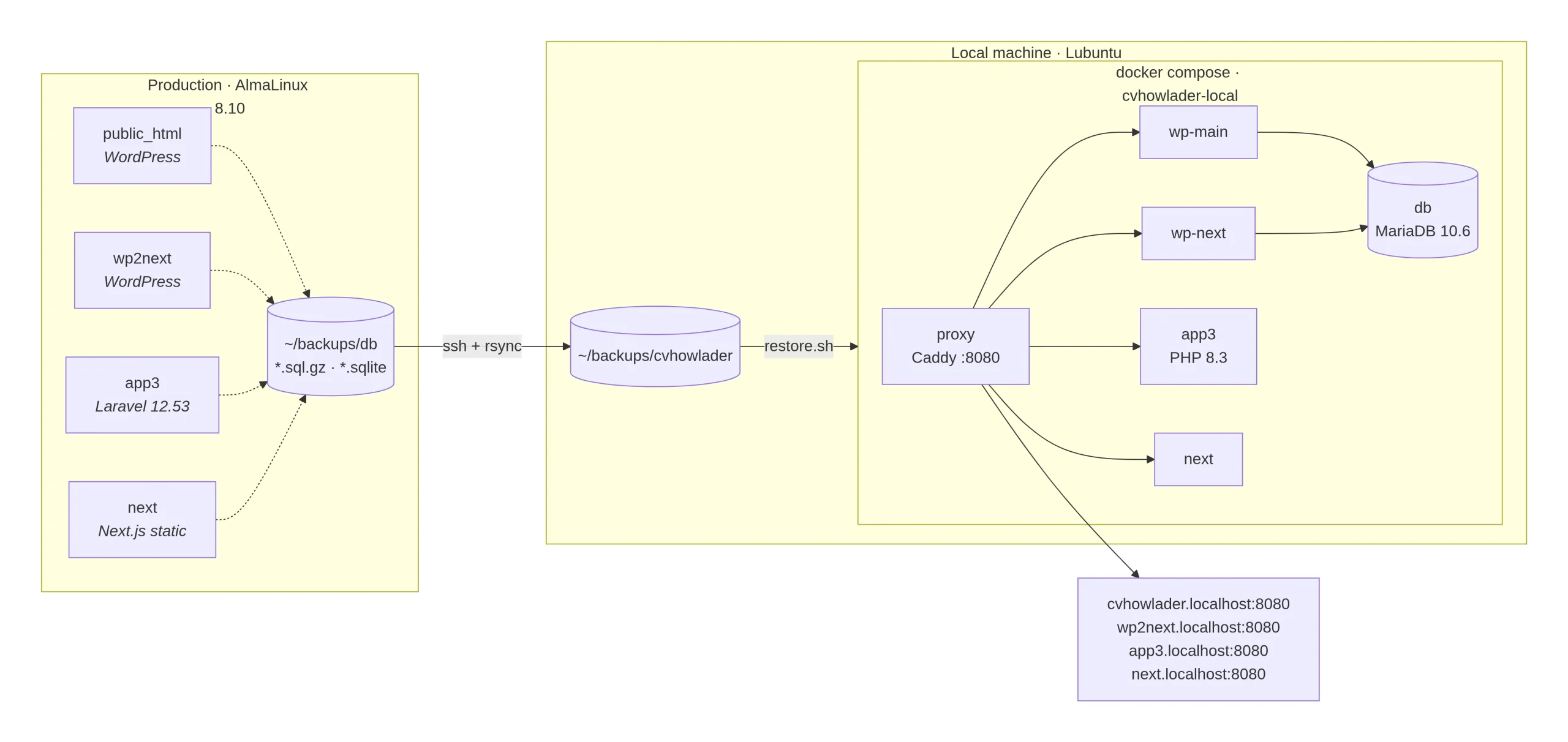
The stack runs under docker compose with a project name cvhowlader-local. Here is the full picture:
Services
| Service | Image | Role |
|---|---|---|
proxy | caddy:2-alpine | Front door. Routes by Host header. |
wp-main | cvhowlader-php:8.3 | Main WordPress site |
wp-next | cvhowlader-php:8.3 | Headless WordPress backend |
app3 | cvhowlader-php:8.3 | Laravel, APACHE_DOCUMENT_ROOT=/var/www/html/public |
db | mariadb:10.6 | One server, one database per WordPress site |
mailpit | axllent/mailpit | Mail catcher, 127.0.0.1:8025 |
The critical trick is in the proxy service definition. Docker network aliases make every *.localhost name resolve inside every container:
yaml
proxy:
  networks:
    default:
      aliases:
        - cvhowlader.localhost
        - wp2next.localhost
        - app3.localhost
        - next.localhost
A WordPress loopback request to http://cvhowlader.localhost:8080/wp-cron.php from inside the wp-main container reaches Caddy, which proxies back to wp-main. No /etc/hosts hacks. No host.docker.internal. This single YAML block removes a whole class of bugs.
The Three Scripts
cvh-dump.sh — runs on the server
Creates fresh dumps in ~/backups/db/. It deliberately omits set -e so one failed dump doesn’t abort the others. It accumulates a return code and exits non-zero if anything failed.
WordPress dumps are mysqldump --single-transaction --quick piped to gzip. Credentials are read from wp-config.php with a regex.
The SQLite snapshot is the interesting part:
python
c = sqlite3.connect(src, timeout=30, isolation_level=None)
c.execute("PRAGMA wal_checkpoint(TRUNCATE)")   # flush WAL into the main file
c.execute("BEGIN IMMEDIATE")                    # block other writers
shutil.copyfile(src, dst)                       # copy while we hold the lock
c.execute("ROLLBACK")
A naive cp database.sqlite can capture a half-written database. This sequence checkpoints the write-ahead log, acquires a write lock, copies the file, then releases. Readers are unaffected. Only writers block, and only for the duration of a 700 KB copy.
If Python 3 is unavailable, it falls back to a plain cp and marks the result OK* — honest about the downgrade.
backup-pull.sh — runs on the local machine
One ssh call to trigger cvh-dump.sh, then five rsync calls to pull files and databases into $BACKUP_DIR.
Exclusions are deliberate. WordPress caches, logs, and backup plugin directories are skipped. For Laravel, vendor/ is kept — a restore then never depends on Packagist. node_modules/, logs, compiled views, and the live database.sqlite are excluded, because a consistent snapshot comes from cvh-dump.sh instead.
This script is where an SSH key matters most. Without one, the user types a password six times. Repeated failed password attempts are the usual trigger for fail2ban bans. A key eliminates both the friction and the risk.
restore.sh — runs on the local(local production server clone) machine
The largest script. Its flow:
- Parse options (
-y,--only,--skip-files,--skip-db). - Pre-flight: verify every required backup exists before touching anything.
docker compose up -d --build.- Wait for MariaDB with a 60-attempt loop.
- Restore each selected app.
- Restart the proxy.
Two details stand out. First, set_env() patches .env files idempotently:
bash
set_env() {
  if grep -qE "^$2=" "$1"; then sed -i -E "s|^$2=.*|$2=$3|" "$1"; else echo "$2=$3" >> "$1"; fi
}
Second, the WordPress URL rewrite runs twice per production host — once for the plain form and once for the escaped form:
bash
wps "$svc" search-replace "$src2" "$lurl2" --all-tables --skip-columns=guid
wps "$svc" search-replace "$(esc "$src2")" "$(esc "$lurl2")" --all-tables --skip-columns=guid
The escaped pass catches https:\/\/cvhowlader.com inside serialized PHP payloads. --skip-columns=guid preserves RSS identifiers.
How Each App Is Handled
WordPress (public_html, wp2next)
Each site gets its own database. Every known production URL is rewritten to its local(local production server clone) equivalent in all tables. A localadmin / localadmin administrator is created or reset. Mail is blocked by default through a drop-in mu-plugin. The production .htaccess is moved aside and replaced with a plain WordPress rule set — no HTTPS redirect.
The cross-site rewrite matters because the main WordPress site links to the headless backend. Without it, those links would escape to production.
Laravel (app3)
The SQLite snapshot is copied to database/database.sqlite. The .env is patched for local use. APP_KEY is untouched, so encrypted session data remains readable. INERTIA_SSR_ENABLED is set to false because no SSR server runs on production either.
Because SESSION_DRIVER, CACHE_STORE, and QUEUE_CONNECTION are all database, and the database is SQLite, there is no Redis to recreate. This is the single biggest reason the Laravel clone is trivial compared to a typical stack.
Next.js (next)
The export is served as static files with production URLs rewritten inside .html, .js, .json, .txt, .xml, and .css. Caddy serves it read-only.
What the Production Audit Revealed
The inventory surfaced three production issues unrelated to the clone, each worth fixing on its own.
1. APP_ENV=local and APP_URL=http://localhost on a live Laravel site. Combined with APP_DEBUG, visitors could see full stack traces on errors. This is a genuine information-disclosure risk. Check grep APP_DEBUG .env immediately. If it returns true, fix it.
2. A 261 MB ~/bin containing a full rootless Docker install (dockerd, runc, containerd) that is not running. It is a leftover experiment. Remove it.
3. A 21 MB ~/cron.log. The tail shows the Laravel scheduler running on an empty schedule. Not a hidden job, but 21 MB of log for nothing. Rotate it.
Minor observations: ~/cwp_stats (540 MB) is CWP panel data. ~/demo.cvhowlader.com (310 MB) is deliberately skipped. The CLI php has a broken ionCube loader — the web PHP is a different build. Nothing in the stack needs ionCube.
Missing files in the zip
The archive is missing two files that docker-compose.yml references. restore.sh will fail at docker compose up -d --build until they exist. Here are reference implementations matching the design.
php/Dockerfile
dockerfile
FROM php:8.3-apache

ARG APP_UID=1000
ARG APP_GID=1000
ARG INSTALL_IONCUBE=0

RUN apt-get update && apt-get install -y --no-install-recommends \
      git unzip zip libzip-dev libpng-dev libjpeg-dev libfreetype6-dev \
      libonig-dev libxml2-dev libicu-dev default-mysql-client \
 && docker-php-ext-configure gd --with-freetype --with-jpeg \
 && docker-php-ext-install -j"$(nproc)" \
      mysqli pdo_mysql pdo_sqlite gd zip intl mbstring opcache exif bcmath \
 && a2enmod rewrite headers expires \
 && rm -rf /var/lib/apt/lists/*

RUN groupmod -o -g "$APP_GID" www-data \
 && usermod  -o -u "$APP_UID" -g "$APP_GID" www-data

RUN curl -fsSL https://raw.githubusercontent.com/wp-cli/builds/gh-pages/phar/wp-cli.phar \
      -o /usr/local/bin/wp && chmod +x /usr/local/bin/wp

WORKDIR /var/www/html
proxy/Caddyfile
caddyfile
{
    auto_https off
}

:{$PROXY_PORT:8080} {
    @main   host cvhowlader.localhost
    @wpnext host wp2next.localhost
    @app3   host app3.localhost
    @next   host next.localhost

    handle @main   { reverse_proxy wp-main:80 }
    handle @wpnext { reverse_proxy wp-next:80 }
    handle @app3   { reverse_proxy app3:80 }

    handle @next {
        root * /srv/next
        try_files {path} {path}.html {path}/index.html /index.html
        file_server
    }
}
Testing: What Was Verified and What Wasn’t
| Checked | Method |
|---|---|
| Shell syntax of all three scripts | bash -n |
| Compose file validity | docker compose config |
| URL rewrite logic | Sample data |
| SQLite snapshot logic | Sample database |
.env patching | Sample file |
| Dump format | Plain mysqldump -u user dbname — no CREATE DATABASE/USE |
| Not verified | Why |
|---|---|
| Docker build | Docker not run in the authoring environment |
| Caddy routing | Same |
| Real restore end-to-end | Depends on real backups |
| Container file ownership | Depends on APP_UID/APP_GID matching |
Expect one or two small fixes on the first real run. First restore will also pull the PHP, MariaDB, and Caddy images — several minutes.
The Emergency Playbook
The local production server clone covers three scenarios.
Server unreachable. The local machine holds a complete copy of all four apps and both databases. Nothing is lost that was captured in the last pull. Content can be extracted from the local WordPress admin, or the local MariaDB can be queried directly.
Lockout via firewall. fail2ban and CSF ban by IP after repeated failed SSH logins. The usual trigger is password-based automation — exactly what backup-pull.sh does across six connections. An SSH key eliminates that trigger. If a lockout happens anyway, Cloudflare lets DNS be repointed immediately, and the local clone is the working reference while access is recovered.
Backup verification. Restore the latest dump locally(local production server clone) before a risky production change. If it doesn’t open, the backup is bad — and it is much better to find that out now.
Honest limits. The clone binds to 127.0.0.1, so it cannot serve public traffic. Using it as a live emergency origin requires a tunnel — Cloudflare Tunnel, Tailscale Funnel — and a DNS change. That is a viable last resort, but it is a separate procedure from the restore itself.
Runbook
One-time setup
bash
unzip cvhowlader-local.zip && cd cvhowlader-local
chmod +x backup-pull.sh restore.sh server/cvh-dump.sh

cp .env.example .env

ssh-keygen -t ed25519
ssh-copy-id cvhowlad@mail.cvhowlader.com
ssh cvhowlad@mail.cvhowlader.com 'echo key login works'

scp server/cvh-dump.sh cvhowlad@mail.cvhowlader.com:~/bin/
Every refresh
bash
./backup-pull.sh
./restore.sh
Selective restore
bash
./restore.sh -y --only app3
./restore.sh --skip-db
./restore.sh --only wp-main,wp-next
Sites after restore
| URL | Login |
|---|---|
http://cvhowlader.localhost:8080 | /wp-admin — localadmin / localadmin |
http://wp2next.localhost:8080 | same |
http://app3.localhost:8080 | — |
http://next.localhost:8080 | — |
http://localhost:8025 | Mailpit (when MAIL_MODE=catch) |
Cross-Platform Notes
The scripts were written for Linux. Here is what changes on macOS and Windows.
Linux (Lubuntu) — chmod +x after unzip. Docker Engine plus the Compose plugin. APP_UID/APP_GID derived from id -u/id -g. *.localhost resolves via nss-myhostname.
macOS — Docker Desktop or Colima. .localhost resolves on modern macOS. BSD sed breaks the static rewrite. Replace sed -i -E -f with sed -i '' -E -f, or detect and branch. Bundled rsync is 2.6.9; the flags used here work, but newer features will not.
Windows — Use WSL2 with Docker Desktop, running everything inside a WSL2 Ubuntu distribution. chmod does not exist in PowerShell. Line endings must be LF. A .sh file saved with CRLF fails with /usr/bin/env: 'bash\r': No such file or directory. Add *.sh text eol=lf to .gitattributes. Keep the project inside the WSL filesystem, not /mnt/c/.
Lessons Learned
A backup is not a backup until it has been restored. The entire project exists because that test had never been run.
SQLite needs a snapshot, not a copy. The wal_checkpoint + BEGIN IMMEDIATE + copyfile sequence is small but non-obvious.
Static exports need aggressive rewriting. A Next.js export bakes production URLs into HTML, JS chunks, JSON payloads, and sitemaps.
Docker network aliases solve the loopback problem. Giving the proxy container every *.localhost alias means WordPress loopback and wp-cron just work.
Zip archives drop execute bits. Every distribution needs a chmod +x step.
SSH keys are a security control, not just a convenience. Six password prompts per run is annoying. Six failed password prompts per run is how you get banned by your own firewall.
Future Work
A smoke-test loop after restore would turn “it built” into “it works.” A post-restore ownership fix for Laravel’s storage/ and WordPress uploads would remove the most likely first-run friction. Replacing latest() with find -print0 | sort -zV | tail -z -n1 would harden the dump selection. Adding protocol-relative and bare-domain patterns to the static rewrite would close the remaining gaps.
The clone(local production server clone) is already useful. These refinements make it dependable.
If you run a multi-app server and have never restored a backup, start there. The local production server clone is the proof that the backup works — and the local machine is the place where that proof lives.
Don’t forget to check my other posts-
October 2, 2026